current location : Home » categoires :
Troubleshooting Guide Common After-Sales Issues of SAIL SOLAR 5/10/16kWh LiFePO4 Home Energy Storage Battery
Troubleshooting Guide Common After-Sales Issues of SAIL SOLAR 5/10/16kWh LiFePO4 Home Energy Storage Battery
Home solar energy storage systems have become mainstream for self-consumption, off-grid backup, and peak-shaving power saving.
However, many installers and end users encounter confusing battery faults during operation. Many issues are not hardware failures but improper operation, wiring errors or communication mismatches.
Equipped with a full intelligent BMS, SAIL SOLAR lithium energy storage battery allows on-site quick fault detection without complicated disassembly. This essay we will break down the most frequent after-sales complaints and matching solutions.
1. Battery Cannot Charge / Stop Charging Early
-Customer Feedback
The battery only charges to 50%-70% SOC and stops automatically; solar panels cannot fully fill the battery every day.
-Main Causes
--Inverter communication protocol mismatch;
--Cell voltage inconsistency triggers passive balance protection;
--Temperature too low, thermal protection activated;
--Loose RS485/CAN communication cable.
-Quick Troubleshooting with SAIL SOLAR Battery
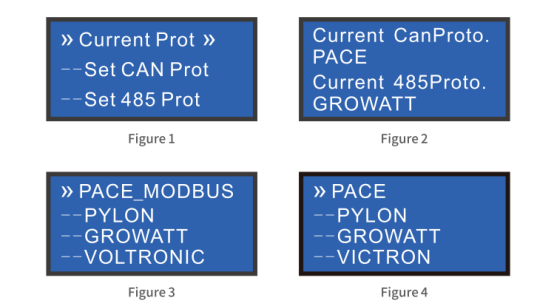
1) .Tap the touch screen HOME page → PROTOCOL menu, input permission password 123456 to unlock protocol switching; select the matched protocol for your inverter (PN_GDLT, GRWT, SMA, GOODWE, PYLONTECH, etc.)
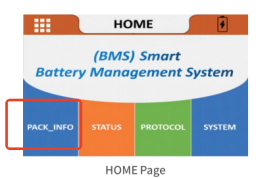
2).Enter PACK_INFO → Cell Voltage page to view max/min cell voltage gap. Our battery supports 300mA passive balancing; leave it charging for 2-3 hours to finish automatic balance.
3).View real-time data from multiple built-in temperature sensors on the screen. If temperature is below 0℃, the heating module will activate automatically; you can manually turn on heating in SYSTEM setting page
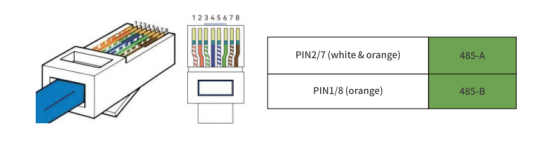
4)Re-plug the CAN/RS485 port on the side panel, use standard CAT6 network cables strictly following RJ45 pin definition:
RS485-A: PIN2/7, RS485-B: PIN1/8
CAN-H: PIN4, CAN-L: PIN5
2. Inverter Reports Communication Failure / No Battery Detected
-Customer Feedback
Inverter pops "battery disconnected" alarm; cannot read battery SOC, voltage data.
-Main Causes
1)Wrong communication wiring pin definition;
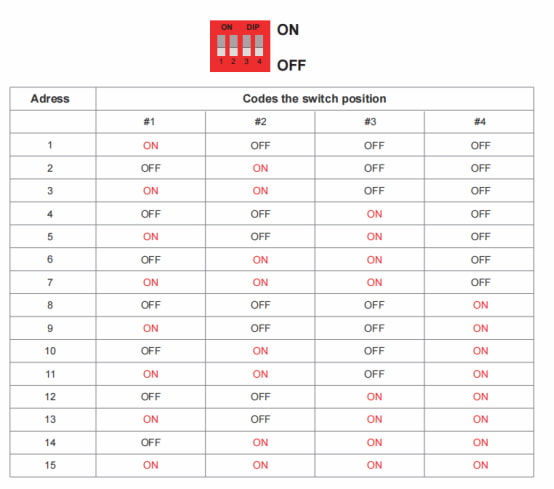
2)Identical DIP address switch settings for parallel battery packs
3)Damaged communication cable.
4)Factory default protocol (Pylontech CAN/RS485) incompatible with the inverter
-Quick Fix
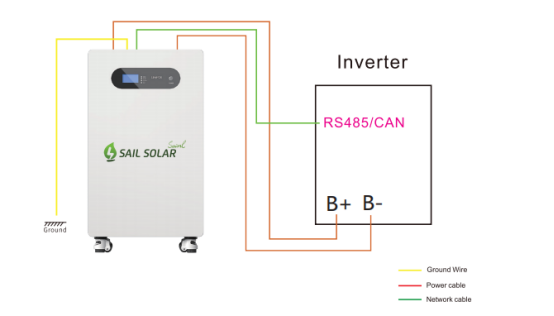
---Single battery system: Wire battery CAN/RS485 port to inverter strictly following official RJ45 pin definition diagram;
---Parallel system (max 16 units allowed):
① Cut off power of all batteries first, adjust the 4-bit DIP address switch on each battery to a unique code (1~15, no duplicate addresses)
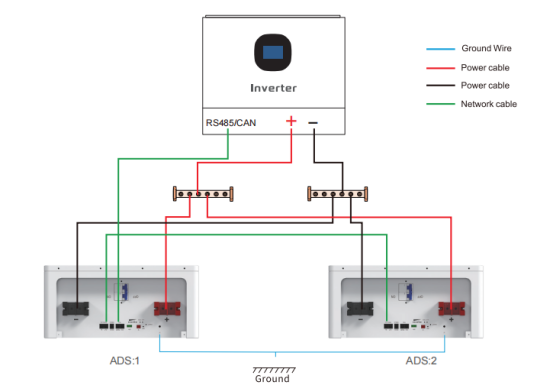
② Link slave batteries via Parallel communication port with CAT6 network cables
③ Ensure all batteries have identical voltage measured by multimeter before powering on
④ Only the master battery connects to the inverter CAN/RS485 communication port.
---Protocol adjustment two options:
*On-site fast switch: Touch screen PROTOCOL menu with password 123456
*Advanced modification: Connect PC to battery RS232 port via USB-to-RS232 cable, open monitoring software, enter password 123456 to edit CAN/RS485 protocol.
(more details about UPPER COMPUTER SOFTWARE OPERATION GUIDE, pls check the user manual in our battery package)
3. Parallel Batteries Unbalanced, One Battery Drains First
-Customer Feedback
Two parallel batteries show inconsistent SOC; one depletes much faster than the other.
-Standard Operation Specification
1)Before parallel connection, use multimeter to verify all batteries have identical voltage;
2)Connect parallel communication cable (Batt Link port) between every two batteries;
3)Unified ground wire connection for all battery units;
4)Master battery connects to inverter communication port only.
5)Adjust 4-bit DIP address switch of each battery to unique address code (1~15, no repetition allowed)
6)Finish all wiring, power on batteries one by one following the official power-on sequence, then turn on the inverter
4. Zero Output Voltage, Battery Cannot Wake Up
-Customer Feedback
No voltage output from positive/negative terminals, touch screen stays completely black.
-Wake-Up Recovery Methods
1)Connect solar panels or grid charger to charge the battery; charging voltage will awake the BMS system
2)Toggle the external power switch OFF then ON for system reset
3)Recharge the battery if under-voltage protection triggered by long-term idle storage
5.Bluetooth EN BMS APP Fails to Search & Connect Battery
-Customer Feedback
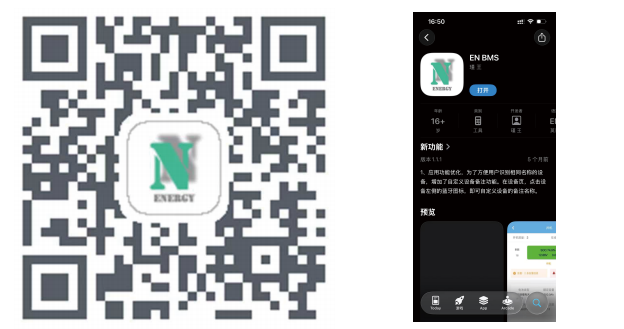
After scanning the QR code to download the Android EN BMS APP, users cannot find the battery Bluetooth device.
-Fast Troubleshooting
*Fully enable Bluetooth on your Android smartphone
*Confirm the battery’s side main power switch is ON and the touch screen lights up normally
*Tap the "ReScan Device" button on the APP device page to re-scan
*Use default login credentials: Username admin, Password 111111
If connection still fails, press the RST reset button on battery side panel to restart the whole BMS system.
6.Battery Capacity Drains Rapidly, Short Backup Duration
-Customer Feedback
Fully charged battery runs out quickly under light loads; actual usable capacity is far lower than rated 5kWh/10kWh/16kWh.
-Fast Troubleshooting
*Enter PACK_INFO → Cell Voltage page to check balance gap; run a full charge-discharge cycle to activate passive balancing
*Optimize storage habits: Long-term idle without supplementary charging triggers deep discharge damage. Keep SOC between 40%-60% during storage and recharge every 3 months
*Avoid frequent deep discharge below 20% SOC to slow capacity attenuation
*Check parallel DIP switches: Duplicate addresses will cause unbalanced current sharing and fast capacity loss
7.Screen Malfunction: Black Screen / Partial Display Loss
-Customer Feedback
The screen backlight is on but no text, or incomplete display content; screen auto-sleeps quickly.
-Fast Troubleshooting
Normal sleep logic: Screen auto enters sleep after 3 mins of no operation; tap any position of the screen to wake up directly
New unit black screen: Power off the battery, press RST button to reset; if still abnormal, check internal screen wiring
Long-term use screen aging: Contact SAIL SOLAR after-sales team for touch panel replacement
8. Sudden Power Cut Due to Over-current / Over-Temperature Protection
-Customer Feedback
The battery shuts down instantly when high-power loads (AC, water heater) are turned on; the touch screen displays protection alerts.
Standard After-Sales Operation Tips for Installers & End Users
--All installation, wiring and maintenance work must be completed by certified professional technicians with insulated protective tools.
--Unauthorized disassembly of the battery casing will void the warranty.
--Store the battery in cool, dry spaces, avoid direct sunlight and water immersion.
--Stop use immediately and contact SAIL SOLAR technical support if abnormal heating, swelling or strange odors appear.
--For long-term storage, maintain SOC at 40%-60% and replenish electricity every 3 months.
--Strictly follow official power-on sequence: Power on all batteries first → Turn on inverter, reverse operation when shutting down the system.
Most after-sales problems of home energy storage batteries come from incorrect wiring, protocol mismatching or improper operation, rather than hardware defects.
SAIL SOLAR LiFePO4 battery integrates complete visual screen and Bluetooth APP, enabling fast self-troubleshooting for nearly all common faults.
For unresolved technical problems, our global after-sales team provides full technical support via our official website: www.sailsolaress.com
prev AC-Coupled vs DC-Coupled PV Energy Storage System-How To Choose For Solar Power Plant?
next Why Lithium Batteries Are Becoming the Preferred Power Solution for Modern Jet Skis